Prerequisite:
- existing correspondence via our ticket portal.
- admin-credentials for your tenant
- the external admin requires at least his own "3DSwymer" + "Collaborative Industry Innovator" license (BECHTLE PLM austria already fullfils this requirement)
- Login to your platform and access the members-management Tab using this link:
https://eu1-ifwe.3dexperience.3ds.com/#dashboard:e88a79f9-b86c-449d-b438-dca5445d4a9b/tab:Members/invite-grant-roles - Follow these steps to activate the possibility to invite users that bring their own license:

Finally invite a new User and use the Mailadress of our Assistance-Admin: planet_admin@cad.at Please go sure to use the "permission" "Administrator". 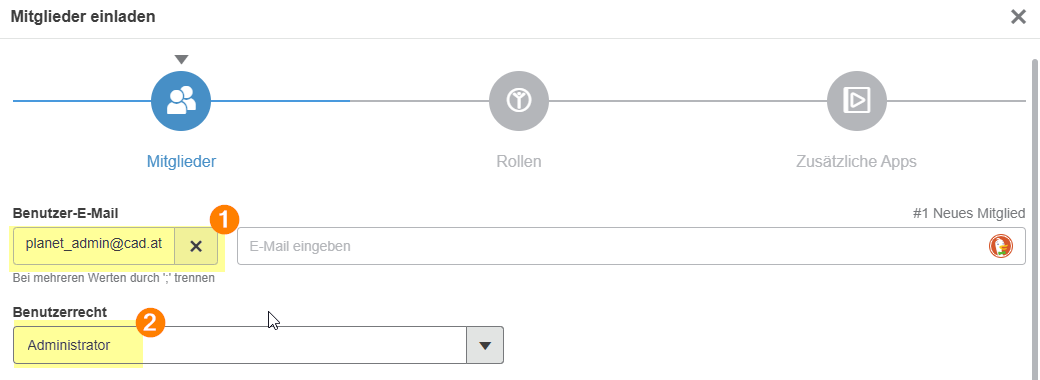
In the next step go sure that the "3DSwymer" License is activated but NOT assigned.
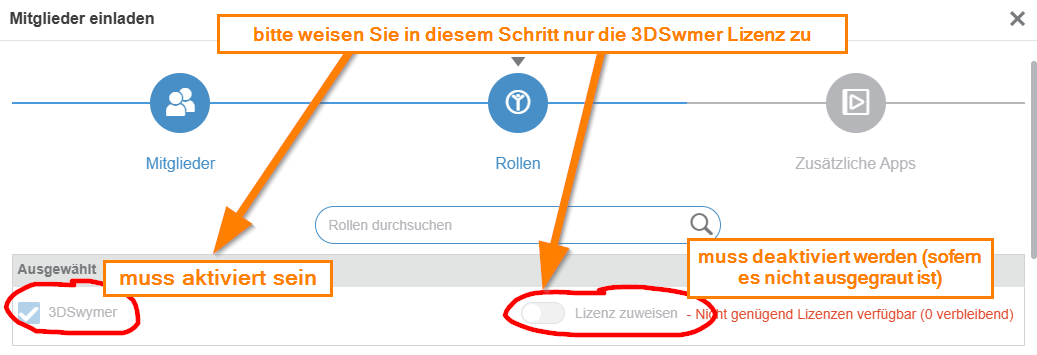
Congratulations! You have successfully invidet the assistance administrator of BECHTLE PLM austria
Remove the assistant administrator again as soon as you no longer need the services by clicking on "block user" and then on "remove user":

Prerequisite: existing correspondence via our ticket portal.
Check the option from the following support article in your tenant:
https://support.cad.at/de/support/solutions/articles/101000519613-howto-jemanden-in-3dexperience-einladen-der-bereits-solidworks-cloud-services-besitzt
The ticket will provide you with the e-mail address of the person who will be made assistant administrator. Invite this person to your platform as an "administrator" as described in the article https://support.cad.at/de/support/solutions/articles/101000519613-howto-jemanden-in-3dexperience-einladen-der-bereits-solidworks-cloud-services-besitzt.
Remove the assistant administrator again as soon as you no longer need the services by clicking on "block user" and then on "remove user":
Translated with DeepL.com (free version)